
Documentation

MarkerSeek web help

A practical guide for running plastome marker discovery, reading the web outputs, and reporting candidate-marker evidence in a manuscript-ready workflow.

Overview

MarkerSeek compares annotated chloroplast or plastid GenBank records, aligns homologous sequences, estimates nucleotide diversity, detects high-Pi hotspots, scores candidate markers, and prepares result tables and figures for downstream validation.

Primary question

Which plastome regions combine high information content, reliable alignment, interpretable haplotypes, and practical primer design potential?

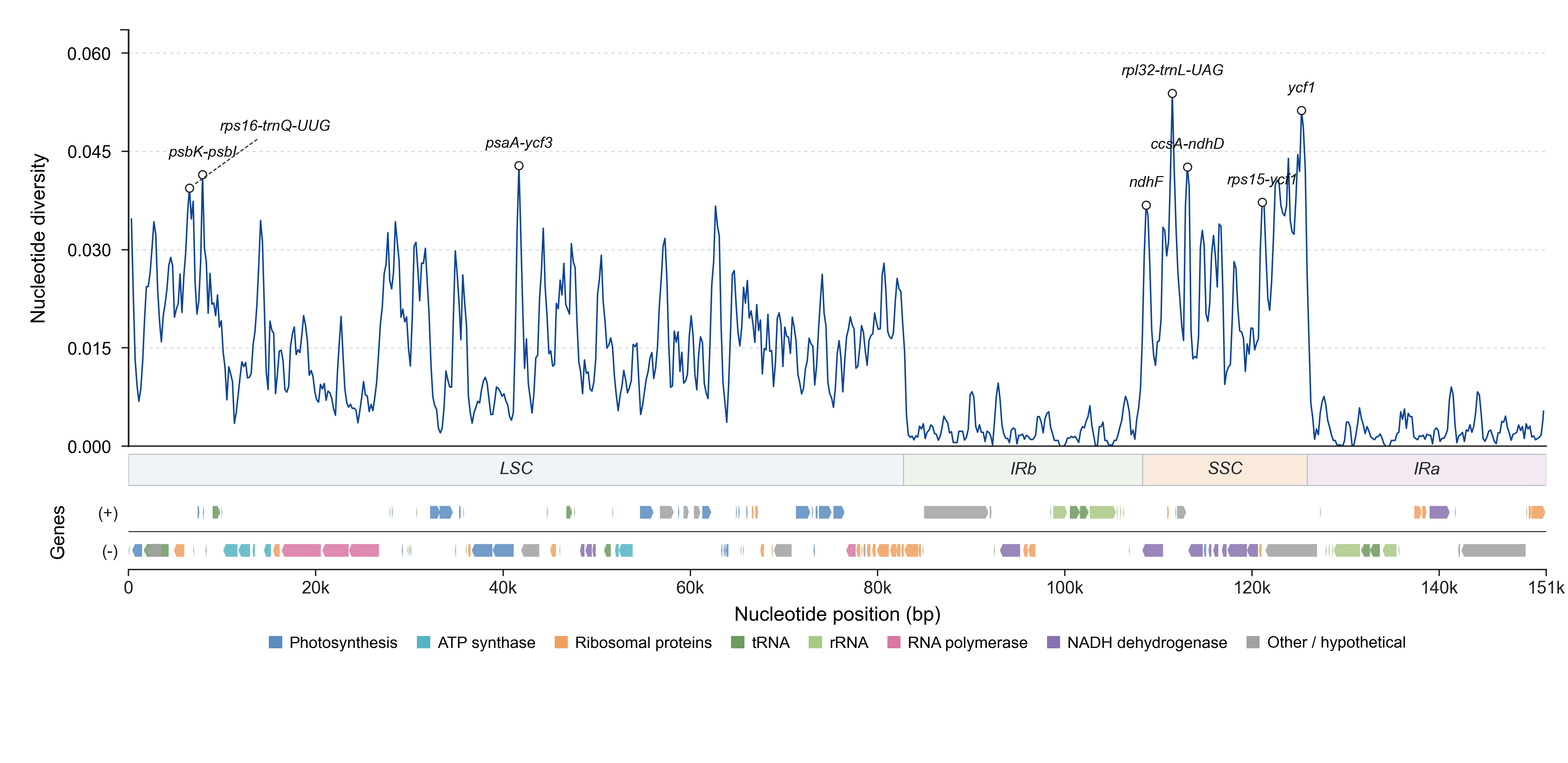
Example MarkerSeek Pi plot
Example diversity plot from the permanent Salvia demo.

Input requirements

Use consistently annotated GenBank files from the same broad plastome coordinate system. The selected reference controls coordinates, feature labels, and region assignment in the output.

  • Upload between 2 and 20 files with .gb, .gbk, or .genbank extensions.
  • Total upload size is limited to 20 MB.
  • Choose a reference file when you want reproducible labels and coordinates. If no reference is selected, MarkerSeek uses the first sorted input file.
  • Species names are inferred from sample names and used for species-level diagnostics, haplotype interpretation, and PCA grouping.
  • The bundled example uses files in test_data/ and the reference Salvia_chinensis.gb.

Analysis parameters

Default values are suitable for an initial plastome scan. Adjust window sizes and hotspot selection only when your sampling scale or expected marker length requires it.

ParameterPurposePractical guidance
Hotspot window / stepControls the sliding-window Pi scan used to detect local diversity peaks.Use smaller windows for short candidate markers; use larger windows for stable genome-wide scans.
Hotspot mode / valueSelects top percentage, top N, or an explicit Pi threshold.Top-percent is useful for exploratory analyses because it adapts to each dataset.
Similarity window / stepControls the pairwise similarity figure.Keep the similarity step smaller than the window to avoid sparse tracks.
Primer designRuns primer3, in-silico PCR, amplicon alignment, and primer scoring.Enable when conserved flanks and experimental validation are part of the study.
MAFFT threadsLimits alignment worker threads.Choose a value that fits the server CPU allocation.

Web workflow

After submission, the server stores inputs, queues the analysis, writes output files, and exposes a permanent result URL until the retention period expires.

1
Upload and configureSelect GenBank records, choose a reference, and set hotspot, similarity, and primer options.
2
Run and monitorThe submitted job page refreshes while queued or running and shows estimated completion time.
3
Review resultsInspect figures, the Candidate markers table, feature detail panels, and downloadable files.

Output files

Downloadable outputs are designed to support both exploratory inspection and reproducible reporting. The TSV files should be treated as the authoritative data tables.

FileDescription
pi_windows.tsvSliding-window Pi values, valid-site counts, region labels, overlap labels, and hotspot flags.
candidate_marker_features.tsvFeature table containing coordinates, Pi, variable and indel sites, conserved flanks, species diagnostics, alignment reliability, primer availability, and MarkerSeek score.
haplotype_assignments.tsvFeature-level haplotype assignment for each sample.
sample_metadata.tsvSanitized sample names, inferred species labels, and source paths.
primers.tsvPrimer candidates and primer scores when primer design is enabled.
primer_amplicons.fastaSuccessful in-silico PCR products by primer and sample.
primer_amplicons_alignment.fastaMAFFT alignments of primer amplicon groups.
pi_plot.{png,pdf}Genome-wide nucleotide diversity figure with hotspot labels.
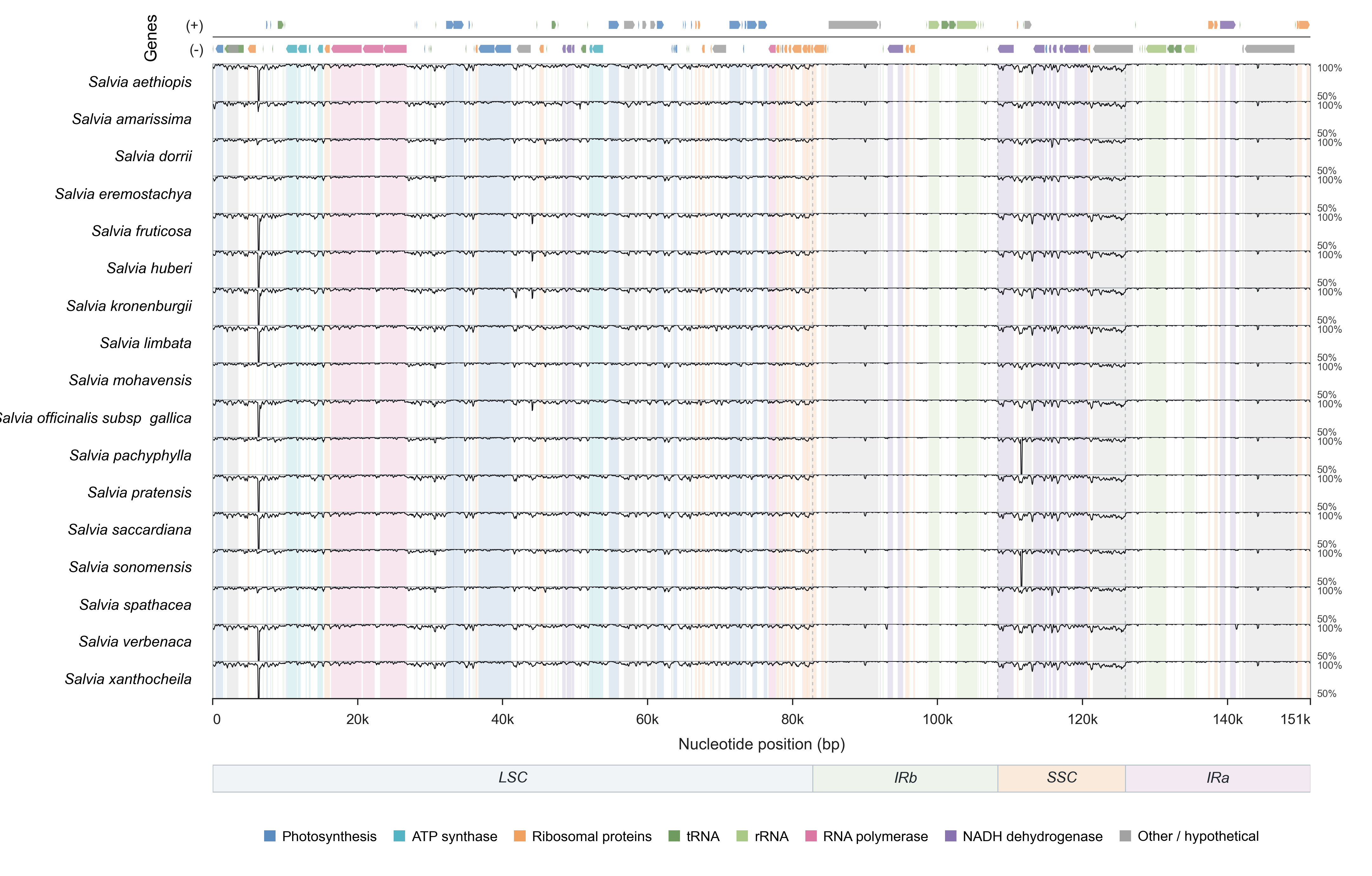
similarity_plot.{png,pdf}Pairwise similarity tracks against the reference.
feature_payload/*.jsonInteractive web payloads for candidate-marker detail panels.

Candidate markers table

The web table is a compact view of the hotspot labels marked in the Pi plot plus the highest-scoring remaining MarkerSeek candidates. It prioritizes the fields most useful during marker screening.

Displayed fieldInterpretation
Label and regionReference-derived marker name and plastome region.
Length (bp)Reference-coordinate marker length; displayed as an integer.
PiFeature-level nucleotide diversity; displayed with three significant digits.
Alignment reliabilityFraction of columns passing gap, ambiguity, and entropy filters.
MarkerSeek scoreComposite 0-100 ranking score within the run.
Primer availableWhether a primer pair passed the configured design and in-silico validation steps.
Example MarkerSeek similarity plot
Pairwise similarity helps interpret whether a candidate region is localized and alignable.

Feature detail page

Open a candidate marker to inspect evidence at the feature level. The detail page is intended to answer whether the marker is diverse, interpretable, and practical for primer-based validation.

Pi Curve

Shows local Pi values across the selected marker. SNP and indel positions are markers on the curve; the legend is placed away from the plotting region.

Alignment Viewer

Displays more bases per line for easier scanning of variable sites while preserving sample names and base-specific colors.

Haplotype Network

Nodes are sized by haplotype frequency. Detailed labels such as frequency and species membership appear on hover to avoid covering the graph.

Species Separation

Projects samples using a pairwise distance matrix so species grouping and outliers can be assessed visually.

Primer design and validation

When enabled, MarkerSeek searches conserved flanks, calls primer3, tests each primer pair by in-silico PCR across samples, and scores successful amplicons.

  • Primer availability depends on conserved flanks, primer3 constraints, tolerated mismatches, and cross-sample amplification success.
  • primers.tsv reports primer sequences, melting temperatures, GC content, primer3 penalty, amplicon length summaries, success rate, and primer score.
  • A high candidate-marker score does not guarantee primer success; primer screening is a separate practical constraint.

Reporting recommendations

For manuscript-style reporting, describe the input dataset, reference choice, sliding-window settings, hotspot rule, primer-design status, and how missing within-species diagnostics were handled.

Report itemRecommended content
DatasetNumber of plastomes, taxon coverage, file source, and selected reference.
Analysis settingsHotspot window and step, hotspot selection mode, similarity window and step, and primer-design settings.
Candidate evidenceLabel, region, length, Pi, variable sites, haplotype count, alignment reliability, primer availability, and MarkerSeek score.
Missing diagnosticsState that within-species metrics were reported as NA when the dataset lacked intraspecific data, such as two or more samples from the same species, or lacked enough valid within-species pairwise distances.

FAQ

Why are some diagnostics NA?

nearest_neighbor_discrimination and barcoding_gap require intraspecific data. They are reported as NA when no species has at least two samples, or when the alignment does not provide enough valid within-species pairwise distances to estimate the statistic. These metrics need at least one species represented by two or more samples, because MarkerSeek must compare distances among samples from the same species. For example, barcoding gap uses the maximum intraspecific distance, and nearest-neighbor discrimination checks whether a sample's closest sequence includes a conspecific sample. If every species has only one sample, those intraspecific comparisons do not exist.

Related within-species diagnostics, including intraspecific divergence and misclassification risk, follow the same rule. In candidate_marker_features.tsv, these cells remain NA; the web table and this FAQ provide the reason without adding extra columns to the data file.

Why are some rows present in the downloadable table but not in Candidate markers?

The downloadable feature table includes the broader feature inventory. The web Candidate markers table focuses on Pi-plot hotspot labels and top-scoring candidates with interactive detail payloads.

How long are jobs retained?

Ordinary jobs are retained for 7 days. The bundled example job is permanent.

Can I use the score as the only selection criterion?

No. Use the score as a ranking aid, then inspect Pi shape, alignment reliability, haplotypes, species separation, and primer results before selecting markers for validation.